Compare
In short
- Compare is how you decide whether a change helped. Line up two to four experiments, registered models or datasets side by side.
- A highlighted cell marks the better number, not a meaningful difference and not a deployment verdict.
- Compare only experiments with the same target, metric and held-out rows. Read the confidence intervals before you trust a small gap.
- An agent can run the comparison for you and apply a stop rule.
Compare experiments
- Open the workspace's Experiments list.
- Tick two to four finished experiments.
- Choose Compare.
You can also get there from a Next steps suggestion on the workspace overview. On the Compare experiments page, add or remove experiments with the chips at the top. The filter narrows a long list. The selection is kept in the page address, so you can share the link.
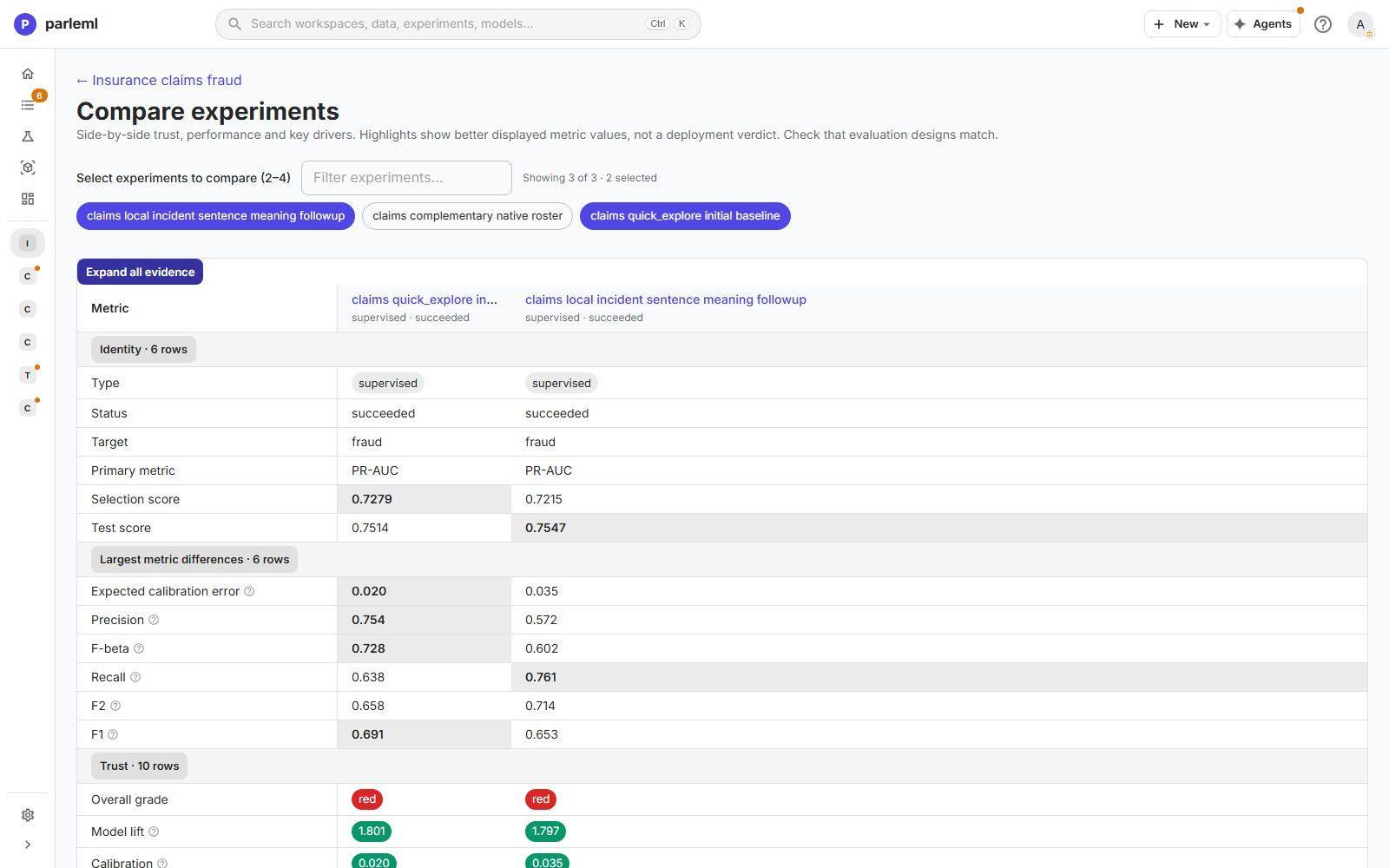
The grid has one column per experiment and a group of rows for each kind of evidence. Expand all evidence opens every group.
| Group | Rows |
|---|---|
| Identity | Type, status, target, primary metric, selection score and test score |
| Largest metric differences | The metrics that move most between the experiments, so the real changes come first |
| Trust | The overall grade and every trust signal: model lift, calibration, drift, fairness, error pockets, rules that hold up, archetype coverage, leakage findings and stability |
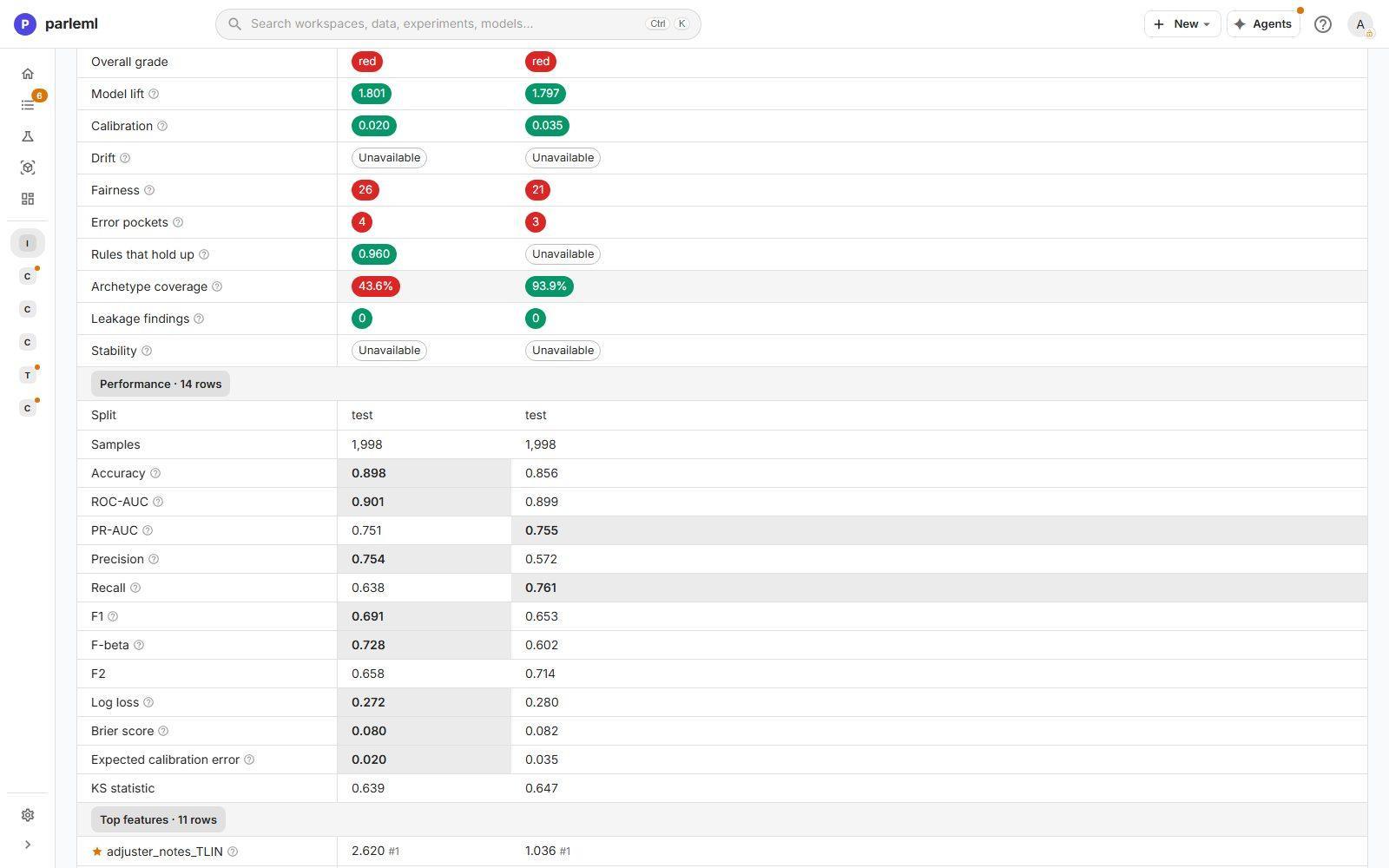
| Performance | The split and sample count, then accuracy, ROC-AUC, PR-AUC, precision, recall, F1, F-beta, F2, log loss, Brier score, expected calibration error and the KS statistic |
| Top features | Each experiment's leading drivers with their rank, starred where they agree |
These groups are for classification and regression. Other kinds get their own evidence in place of the metric groups:
- recommendation and ranking show Native ranking evaluation: shortlist length (K), served policy, evaluation split, graded lists and modelled classes;
- forecast, anomaly, clustering and association runs show Native result evidence: the facts each kind records, such as flagged share or number of groups. No winner is picked from these rows.
Read the whole grid
The better value in each row is highlighted. That marks the better number, not a meaningful difference. The example compares the claims baseline with a follow-up that encoded the incident text by meaning (a sentence embedding). It shows why the full grid matters:
- The follow-up has a slightly better test PR-AUC (0.755 against 0.751) and much better recall (0.761 against 0.638).
- It has much worse precision (0.572 against 0.754), F1 and calibration.
- It covers 94% of target rows with archetypes, against 44%.
- It cannot report "rules that hold up".
- Its selection score is lower (0.7215 against 0.7279), so the session's stop rule kept the baseline.
One headline number would have hidden all of that.
Compare fairly
- Match the evaluation designs. Use the same target, metric, held-out rows and split policy. A difference measured on a different test population is not an improvement. A session's Live results checks this for you and flags a split that differs from the parent's.
- Separate selection from test. In this workspace the baseline has the best selection score (0.728) but the lowest test score (0.751, against 0.755 and 0.761). Gaps this small can be noise: read the confidence intervals on Evaluation.
- Change one thing at a time. The workspace's experiment tree shows each experiment's parent and what changed, so you can tie a gain to its cause.
- Check against the floor. Every experiment records the score of a constant model. Compare with that as well as with each other.
Compare registered models
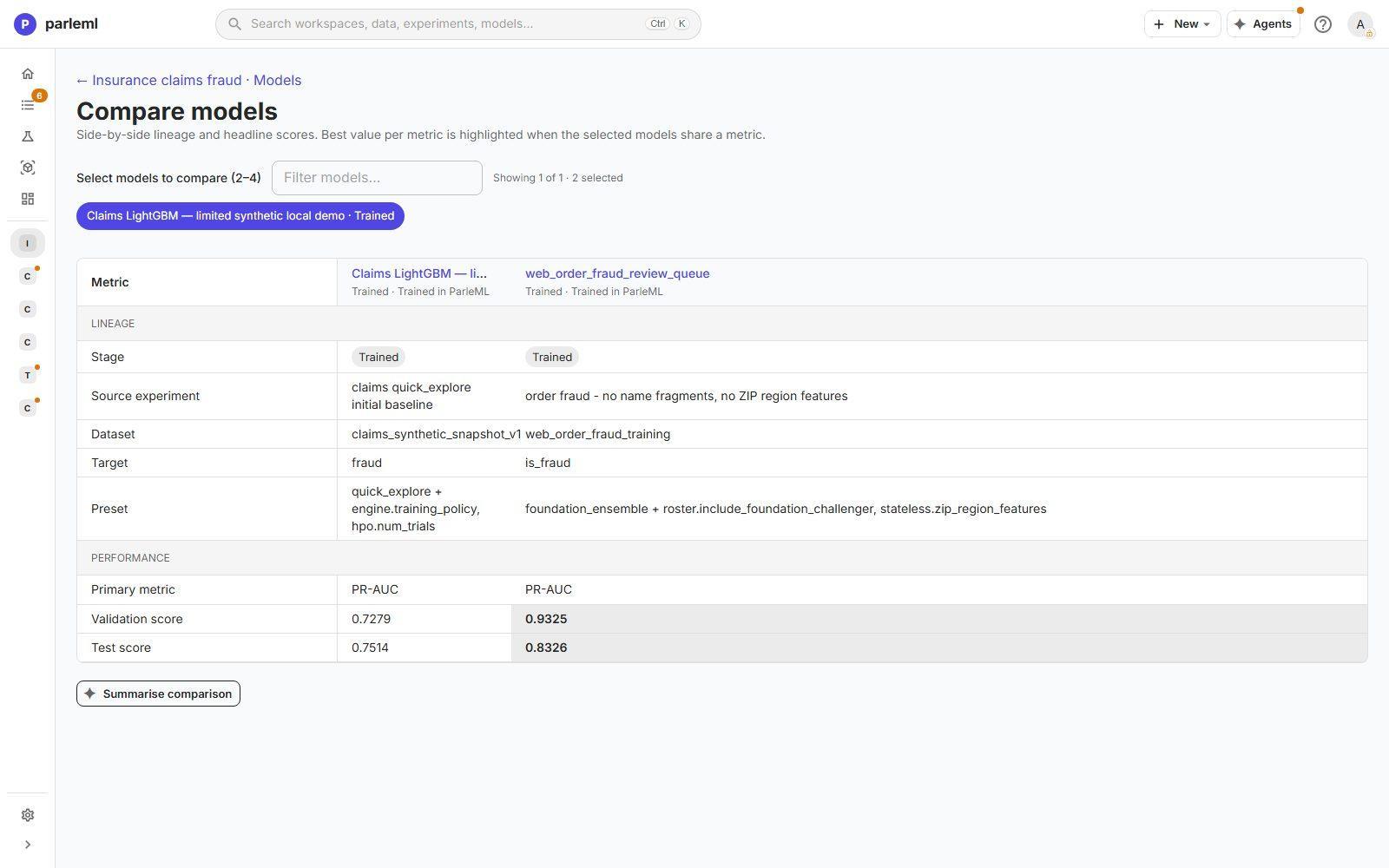
Models → Compare lines up two to four registered models:
- Lineage: stage, source experiment, dataset, target, and the Preset (the template, with its changes);
- Performance: primary metric, validation score and test score.
The best value per metric is highlighted when the models share a metric. The selection is kept in the page address, so you can share the comparison. Summarise comparison asks an agent to write a short summary of it.
Use it before you promote a challenger over the model in production. Read both models' release records too.
Compare datasets
Datasets → Compare measures how each feature's distribution has shifted against a chosen reference dataset (PSI or Information Value). See Datasets and columns.
Ask an agent to compare
A comparison is a good task for an agent. Ask it to compare a challenger with its parent, or with the registered model it would replace. Name the metric and the rows that matter, and ask whether the difference is larger than noise.
The workspace's Next steps offers this directly: each step has a button to do it yourself and a Delegate button that hands it to an agent. When an agent iterates, its plan carries a stop rule: a challenger must beat the baseline by a set margin. The session's Live results shows the verdict.
Next
- Models and release: register the winner and take it through review.
- Workspaces and sessions: hand the comparison to an agent.