A tour of ParleML
Time: about 5 minutes · You'll end with: the handful of ideas every page of the app is built on, and where to find each one.
Open any workspace (the Customer churn sample is fine) and follow along in the left sidebar.
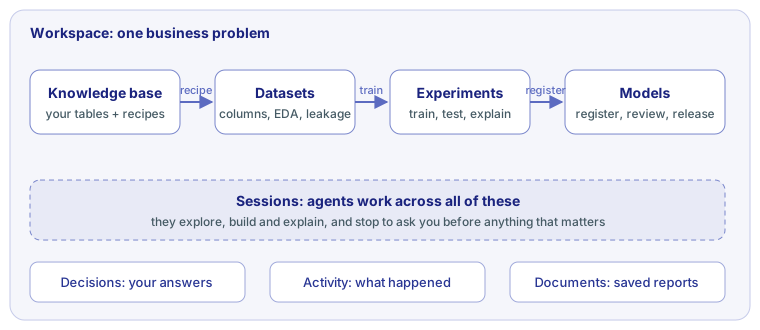
Workspace: one business problem
A workspace holds everything about one problem, such as "which customers will cancel next month": its data, its experiments, its models, the agent sessions that worked on it and the decisions people made. Its Overview says what the problem is, where the work stands and what to do next.
Each workspace also records how its models may be used: the business goal, the risk level and who may override a prediction. Releases are checked against it.
Data: knowledge bases and datasets
A dataset is one table you train on. Upload a CSV or Parquet file, or open a sample. Its pages show you the data before any model does:
- Columns: what each column is (a number, a category, a date, an ID, an email, a ZIP code), and its role: the target, a key, or ignored. ParleML suggests; you confirm.
- EDA: distributions, missing values, correlations and outliers.
- Leakage: columns that would let a model cheat, such as a value only known after the outcome. Fix these before training, not after.
- Signal check: a quick estimate, before any training, of whether there is anything to learn.
A knowledge base holds your raw tables (from files or a database connection) and how they relate. You turn them into a training dataset with a recipe: a SQL query plus the prediction moment, the point in time a prediction is made. ParleML checks the query so no feature reads data from after that moment.
Experiments: train, test, explain
An experiment trains models on a dataset to answer one question. Pick its kind (classification and regression, forecasting, anomaly detection, clustering, recommendation, ranking or association rules) and a template, a ready-made recipe for how hard to try.
Every experiment keeps a test set aside, rows it never trains on, and reports its score there. It also compares against a no-skill baseline, so a model that learned nothing is flagged. Each one then explains itself: which features matter, how they move the prediction, which rules describe the riskiest cases, where the model makes most of its errors, and whether it treats groups fairly.
Models: register, review, release
When an experiment is good enough, you register its model. A model moves through stages: Trained, Validated, Promoted, Shadow (scoring beside the live model without acting), Production, and Archived when retired. Each promotion is a person's decision, made in the app with the model card, its limitations and its operating point in front of them. A released model can be used in the app, through the API, or as a Python package.
Sessions: agents doing the work with you
A session is an agent working on a request in a workspace: exploring data, building a model, or answering a question. It uses the same pages and tools you do, and every object it creates is an ordinary dataset, experiment or model you can open. The workspace's Investigations page lists its sessions.
When the agent needs a judgment call, it stops and asks. Your answers are decisions.
The record: Decisions, Activity, Documents
- Decisions: every question an agent asked and how it was answered, with the evidence it was shown.
- Activity: everything that happened in the workspace, by people and by agents.
- Documents: the reports sessions saved, such as framing notes, a challenge review or a release record.
Outside the workspaces
- Home: what needs you, what is running, and your workspaces.
- Experiments and Models in the top of the sidebar: everything across workspaces.
- Settings: agents, connections to databases and MLflow, API tokens, diagnostics.
Next
- Work with an agent, if you haven't yet.
- The user manual covers each page in depth.