Score a new file
Time: about 5 minutes · You need: a finished classification or regression experiment, and the new records as a CSV or Parquet file with the columns the model was trained on. You'll end with: each new row's prediction, a full diagnosis when the true outcome is known and, once the experiment's explanations are computed, the reasons behind each prediction.
1. Add the file to the same workspace
In the workspace, open Datasets → Add dataset and upload the file. A model scores only datasets in its own workspace, so one team's file can't be scored by another team's model by mistake.
- Columns are matched by name, ignoring case, so a file re-saved from Excel still matches.
- Extra columns are ignored.
- The target column is optional.
2. Score it
- On the experiment page, open Decision & use → Batch & Diagnose.
- Choose the Source dataset. (+ Upload new adds a file from here.)
- If the file holds the true outcome, type its name in Label column (optional). The job then becomes a diagnosis: the outcome is kept out of the model's input, and the full set of metrics and charts is computed on the new rows.
- Optional: tick Also export reason codes. You get a per-row CSV with each case's prediction, its top drivers and the rules it matched. It is noticeably slower than scoring alone. Reason codes come from the explanations: until they are computed the box is greyed out. Choose Compute explanations in the experiment's header, wait until it finishes, and score again with the box ticked.
- Choose Run. The job appears under Recent jobs.
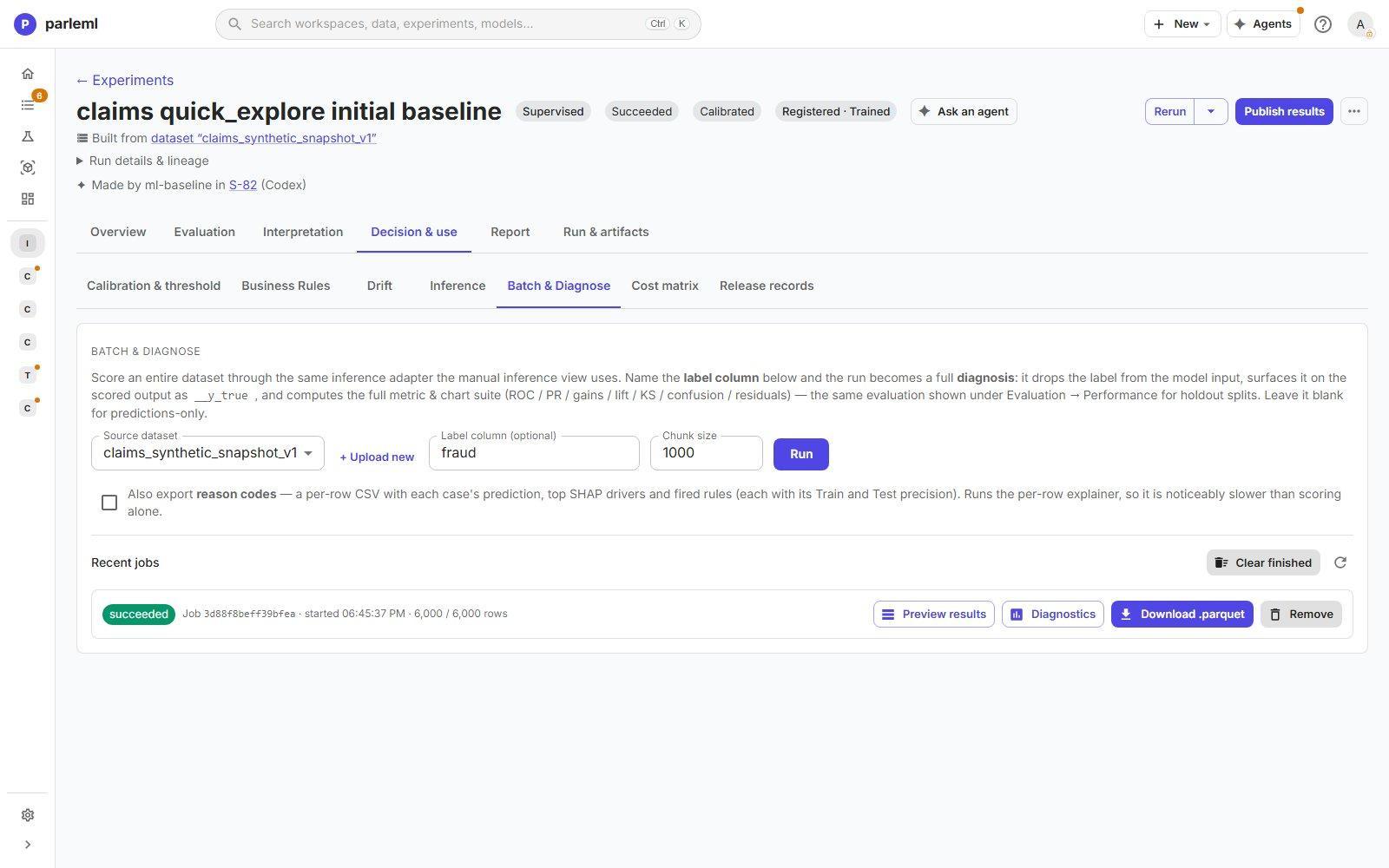
Download the scored file, and the reason codes, from the job's row. Probability columns are
named after the model's classes, __proba_<class>. Read them by name, never by position.
To score a single record, use Decision & use → Inference instead. It shows why the model predicted what it did once the explanations are computed.
Details: other kinds of experiment
Recommendation and learning-to-rank experiments score on the same Batch & Diagnose view, and return ranked lists. Anomaly-detection and clustering experiments that can score new rows do it under Decision & use → Decision & scoring. A clustering method that only describes its own rows cannot score new ones.
3. Check the new data before you trust the scores
Scores on data unlike the training data are not reliable.
- Compare the new dataset with the training dataset under Compare datasets.
- Or start an agent session with ML operate. It compares the two, judges the drift and proposes whether to retrain.
Score outside ParleML
| Where | How |
|---|---|
| Your own Python code | On the model page, Python package downloads a scoring package with predict, predict_proba and a command-line tool. No ParleML server needed. See Use your model in Python. Deployment guide & code examples on the model page gives the code for this model. |
| MLflow or Unity Catalog | Track the run in MLflow. The fitted model is then a standard MLflow model you can load or serve. See Track a run in MLflow. |
| A script or an agent, through the API | With a builder token bound to the workspace: POST /api/experiments/{id}/predict-batch with {"source": {"kind": "dataset", "dataset_id": "<dataset-id>"}, "include_reason_codes": true}, then read the rows from GET /api/experiments/{id}/predict-batch/{job_id}/rows. Downloading the output file stays a person's act in the app. |
<dataset-id> is in the dataset page's address. The API reference
covers tokens and calls.
If something goes wrong
- The dataset is not offered. It is in another workspace. Add the file to the experiment's workspace.
- "Batch scoring & diagnostics appear once the run has finished fitting." The experiment is still running, or it failed. Score from a finished experiment.
- "Reason codes come from the model's explanations, which have not been computed yet." Untick Also export reason codes, or choose Compute explanations in the experiment's header first.
- "This experiment has no fitted model on disk to score with." The trained model is missing: train the experiment again. A bring-your-own model scores through its explanations, so compute them first.
- The job fails with "Source dataset is missing model features: …". A column the model needs was renamed or dropped. The message lists the missing columns and the ones the model was trained on. Restore them in the file, or retrain on the current columns.
Next
- Use your model in Python: score without a ParleML server.
- Models and release: stages, the model card and every download format.